For parents raising a child across two homes

Two homes, one schedule.

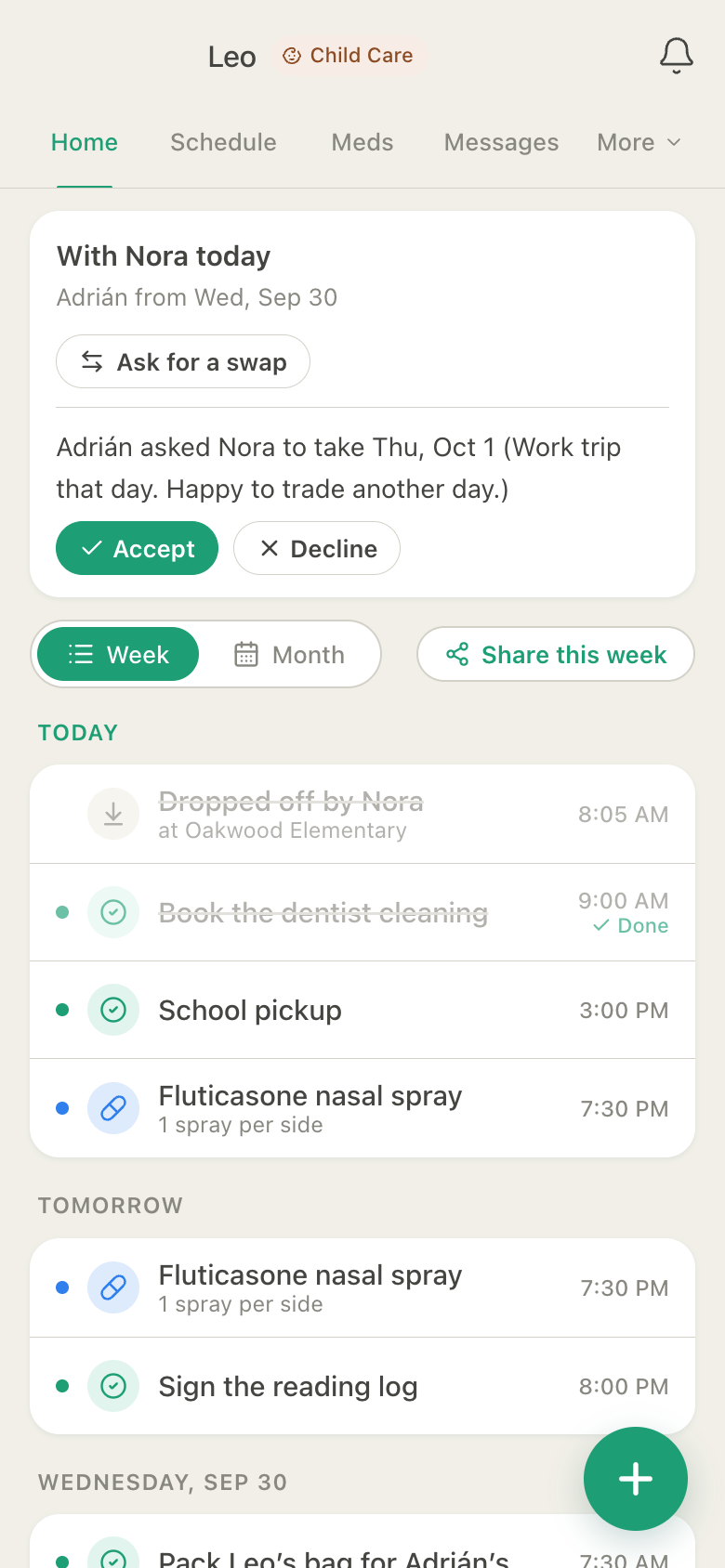
Set your parenting schedule once (alternating weeks, week on and week off, or 2-2-3) and HuddleCare shows whose day it is on both phones. Ask for a swap in two taps; the other parent accepts or declines, and nobody can hand themselves a day.

Now on Google Play and the App Store

Google Play and the Google Play logo are trademarks of Google LLC. App Store is a trademark of Apple Inc.

Free to start. No credit card. Works in any web browser, on Android, and on iPhone.

Leo's Home with Nora today, a swap to answer

HuddleCare Home for Leo: with Nora today and with Adrián from Wednesday, Adrián's request for Nora to take Thursday with Accept and Decline, and today's drop-off, tasks and nasal spray

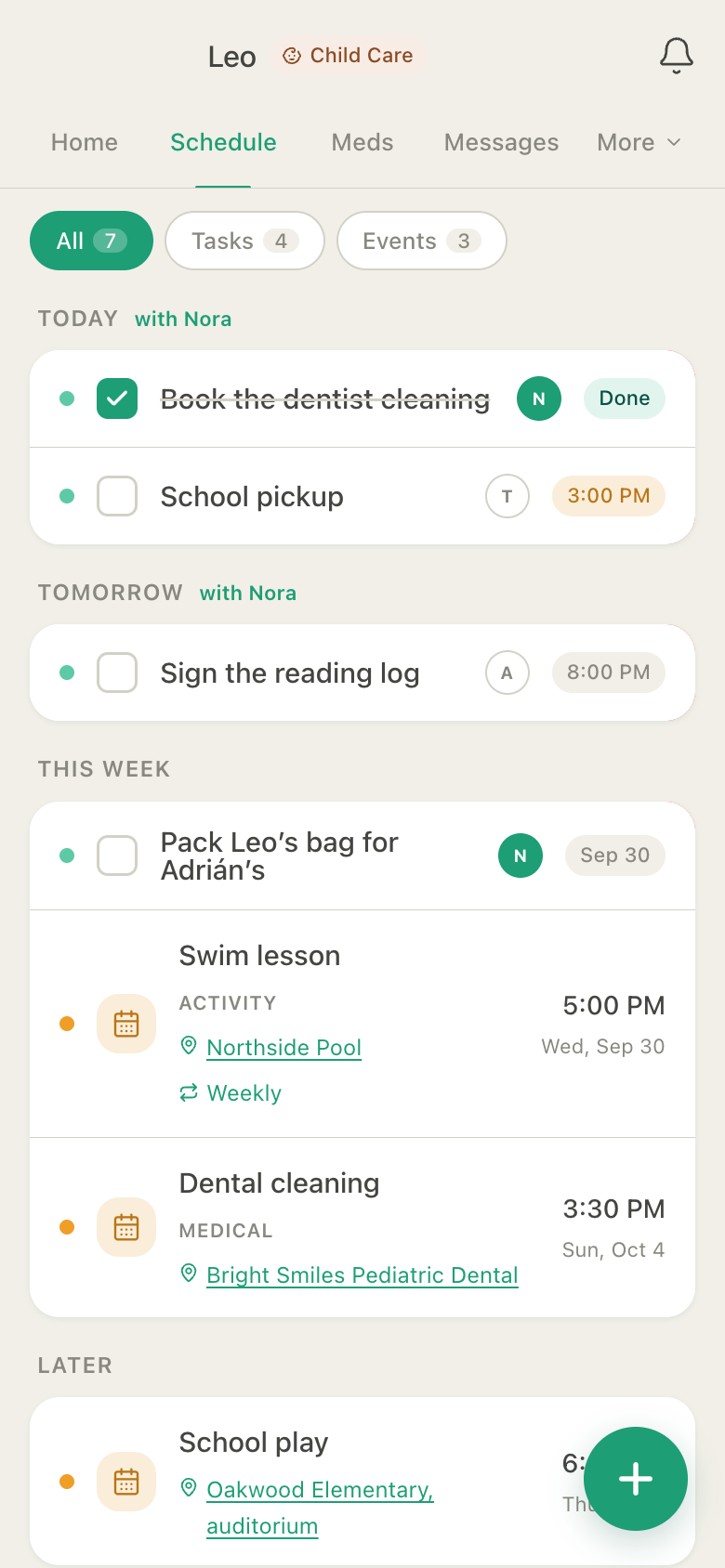
The Schedule whose day it is, at a glance

HuddleCare Schedule for Leo: today and tomorrow marked with Nora, the reading log, packing Leo's bag for Adrián's, a weekly swim lesson and a dental cleaning
Actual app screens, shown with sample data.
Alternating weeks, week on/off, 2-2-3 Swap requests, history kept Pickups & drop-offs logged Grandparents & sitters too Free to start

Sound familiar?

A custody schedule should not live in a text thread.

Whose weekend is it? Did anyone agree to the Thursday swap? Where is the reading log? HuddleCare keeps the schedule, the swaps and the everyday details in one shared place, so both homes work from the same facts.

How it works

Set up your schedule in a few minutes.

  1. 1

    Create your child's huddle

    Choose care for a child, add your child, then invite the other parent. Grandparents, a stepparent or a sitter can join too, with the access you choose.

  2. 2

    Turn on the parenting schedule

    Choose the pattern and the first parent's first day. A band on Home and the Schedule shows who has your child today and when the next switch is.

  3. 3

    Swap days without the back and forth

    Ask for a day with an optional note. It waits on Home until the other parent accepts or declines. An accepted swap changes the schedule, and every request is kept.

What both homes share

Real screens from the app. Nothing mocked up.

Pickups & drop-offs

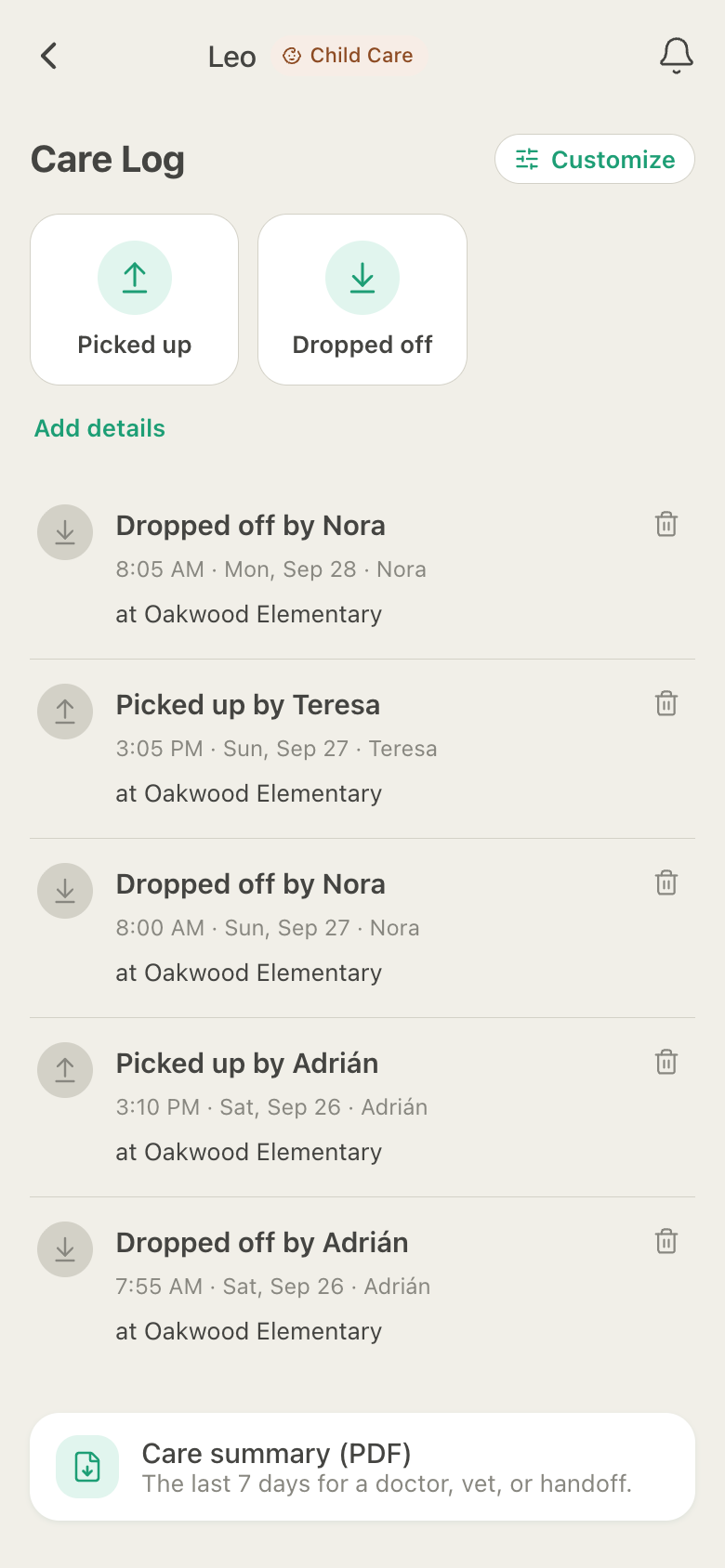
Who picked him up, and where.

Log a pickup or a drop-off in two taps. Each one records who did it and where, checked against the authorized pickup list; a pickup by someone not on the list is marked as unauthorized in the Care Log.

HuddleCare Care Log for Leo: drop-offs by Nora and Adrián and pickups by Teresa and Adrián at Oakwood Elementary over three days

Medications in both homes

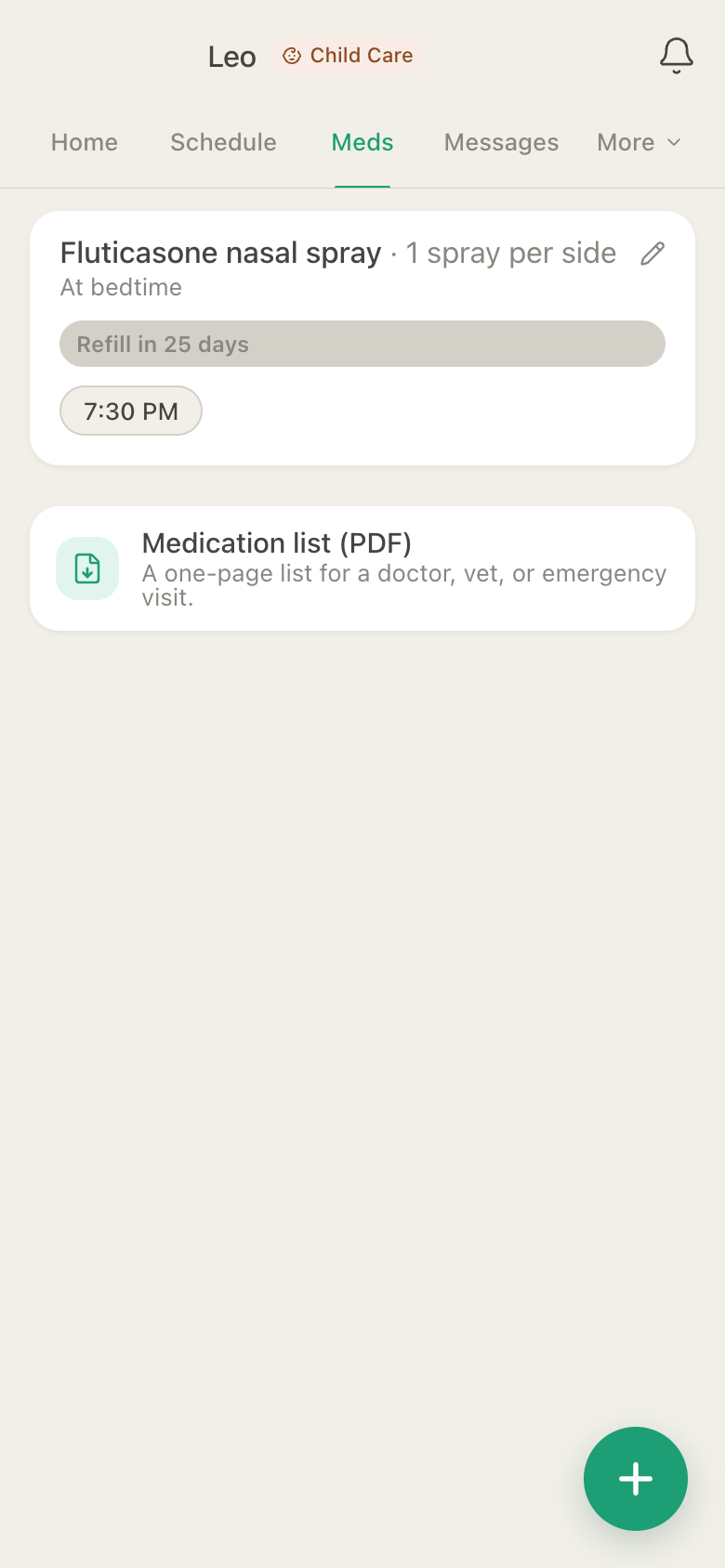
The bedtime spray, whichever home he is in.

One medication list for both homes. Whoever gives the dose taps Given, so the other parent never has to ask. A dose can also be flagged as given at school.

HuddleCare Medications for Leo: fluticasone nasal spray, one spray per side at bedtime, 7:30 PM, with a refill countdown

Emergency Info Card

The school, the pediatrician, the allergy.

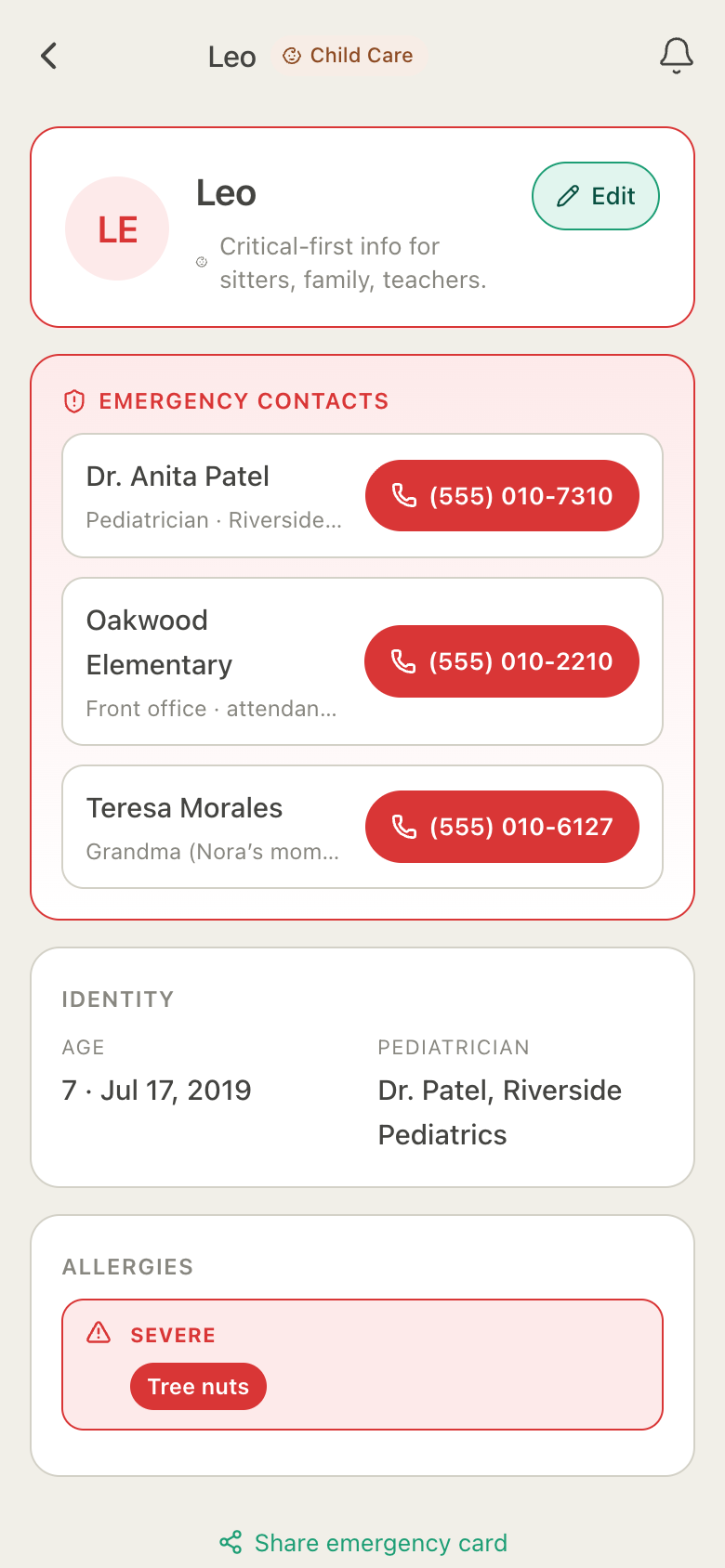
Critical facts first: tap-to-call contacts, severe allergies, the pediatrician, the school and the pickup list. Share it by link with a new sitter or a coach. No account needed to view it.

HuddleCare Emergency Info Card for Leo: tap-to-call numbers for Dr. Anita Patel, Oakwood Elementary and Grandma Teresa, his age and pediatrician, and a severe tree nut allergy

Journal

Handoff notes that do not get lost.

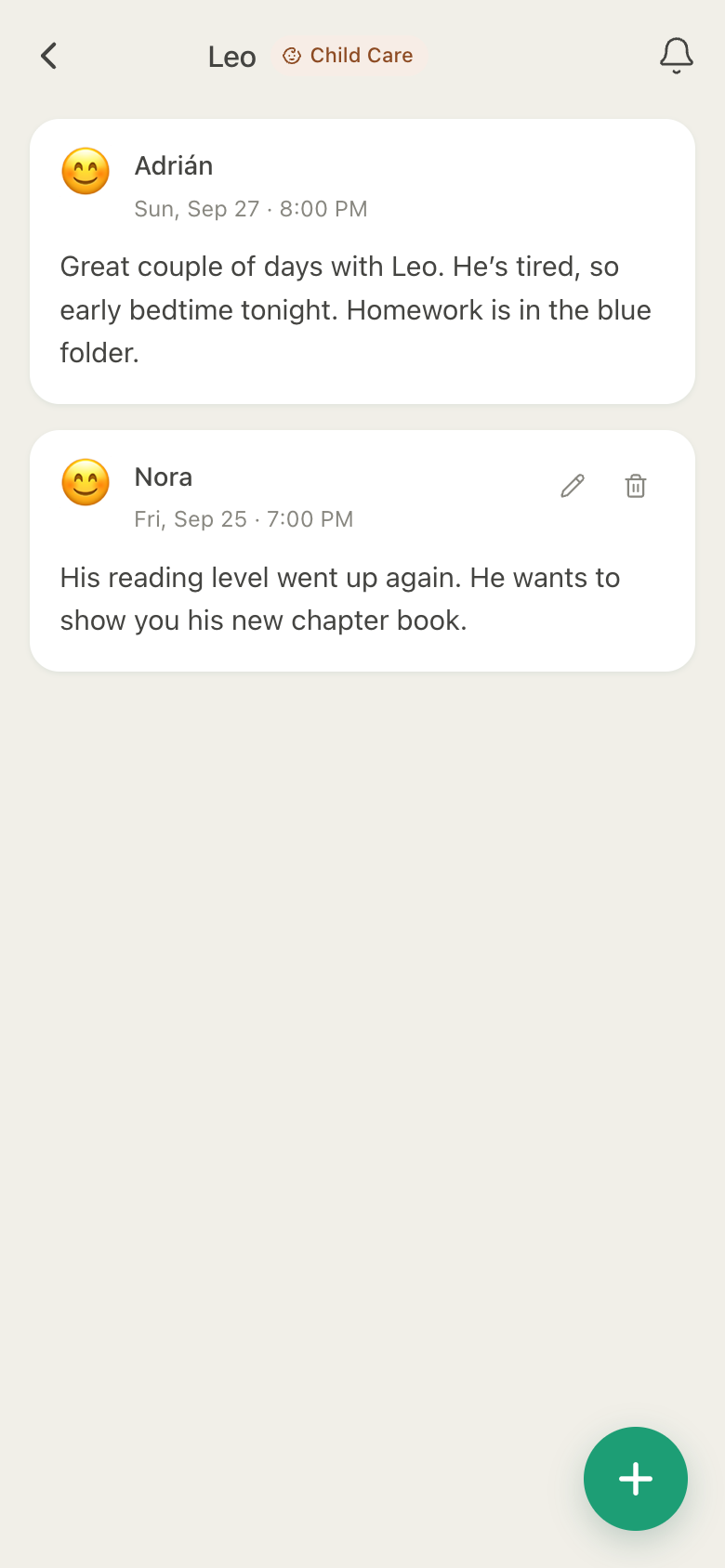
Write how the days went when he changes homes: homework in the blue folder, early bedtime tonight, the new chapter book. Both parents read the same notes, in order.

HuddleCare Journal for Leo: Adrián's handoff note about homework in the blue folder and Nora's note about his reading level

Members

Both parents, and the people who help.

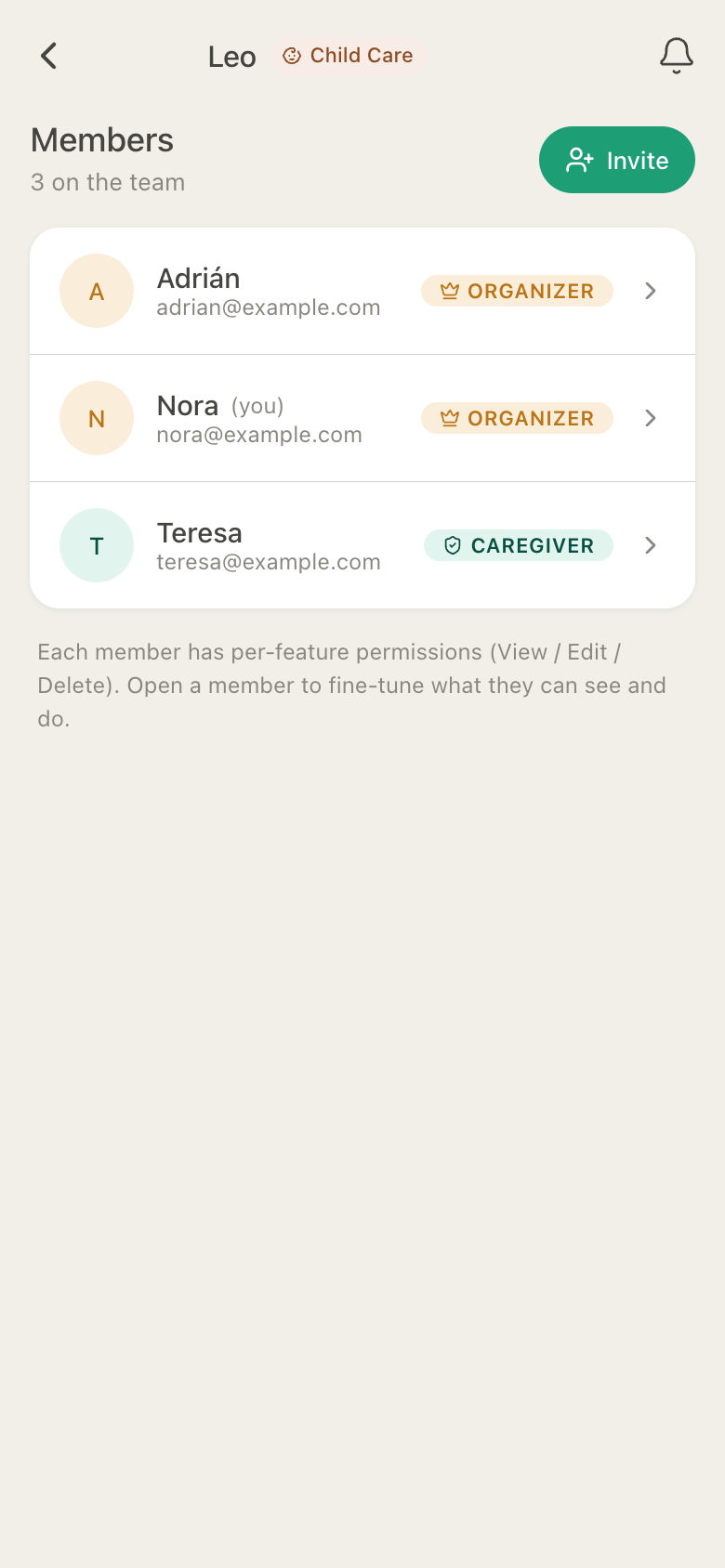
Invite the other parent as an organizer too, so you both manage the huddle. Add a grandparent as a caregiver, a sitter with temporary access, or share The Week Link with the school: a read-only view of the next seven days that expires on its own.

HuddleCare Members for Leo: Adrián and Nora as organizers and Teresa as a caregiver

All screenshots are actual app screens, shown with sample data.

Also for two homes

The everyday details, in one place.

  • Three schedule patterns

    Alternating weeks, week on and week off, or 2-2-3, from the start date you choose.

  • Swaps with a history

    Only the other parent can accept, and every request stays on record.

  • Tasks with names

    Pack the bag, sign the reading log, book the dentist. Assigned, or open to claim.

  • Appointments & activities

    Swim lessons, the dentist, the school play, with the place one tap away.

  • The Week Link

    Seven days, read-only, no account, medication names off by default.

  • Group chat

    One chat for the huddle; direct messages on Plus.

Pricing

Simple, honest pricing.

The parenting schedule, swaps, pickups, medications and the Emergency Info Card are free for up to 5 members. Plus adds direct messages between the two of you, photos in the journal and chat, a year of history, and a huddle for each child (up to 5).

Switch to annual to save 2 months on Plus or Premium.

Free

Get started, no card required

$0forever
Get started free
  • 1 huddle
  • Up to 5 members
  • Unlimited tasks, medications, events & care-log entries
  • Timers, last-done tiles, check-in, measurements & charts
  • Last 3 months of history
  • 5 documents · max 10 MB each · 50 MB per huddle
  • Group chat (direct messages in paid plans)
  • 1 active temporary member
  • Emergency Info Card, The Week Link & Care Card · share by link
  • PDF exports: it's your data, on every plan

Free forever. Ad-supported when ads launch. Ad-free on Plus and Premium.

Best for complex care

Premium

For multiple loved ones and complex care

$14.99 per month
Get Premium

Cancel anytime

  • Up to 10 huddles
  • 25 members per huddle
  • Unlimited history & charts
  • Unlimited documents · 5 GB storage per huddle
  • Unlimited temporary members
  • Direct messages, photos & expenses
  • Ad-free
  • Priority support

Prices in USD. Your care data is never deleted when a plan lapses. Anything over the Free limits becomes read-only until you upgrade again.

Frequently asked

Questions, answered.

Which parenting schedules does HuddleCare support?

Alternating weeks, week on and week off, and 2-2-3. Pick the pattern, the two parents and the first parent's first day; the band on Home and the Schedule then shows who has your child each day and when the next switch is. Single days change through swaps.

How do swaps work?

Either parent can ask the other to take a day, with an optional note. The request waits on the child's Home until the other parent accepts or declines. Only the other parent can accept, so nobody can hand themselves a day, and every request stays in the history.

Can grandparents, a stepparent or the school see the schedule?

Yes. Invite family as caregivers or viewers with the access you choose. For the school, a coach or a sitter, share The Week Link: a read-only view of the next seven days with no account needed, medication names off by default, and an expiry of its own.

Is HuddleCare a legal or court tool?

No. HuddleCare is a family coordination app. It is not a legal service, it does not give legal advice, and it does not produce certified records. If a court order or your parenting plan names a specific app, use that one.

Can we message each other privately?

Every huddle has a group chat on every plan. Direct messages between two members come with Plus and Premium.

What does it cost?

Free includes one huddle with up to 5 members, the parenting schedule and swaps, unlimited tasks, medications and log entries, and 3 months of history, with no credit card and no time limit. Plus is $7.99 a month or $79.99 a year: direct messages, photos, a year of history, and up to 5 huddles, one for each child. The Free tier will be ad-supported once ads launch; Plus and Premium are ad-free.

Looking for something else? Read the full FAQ or visit support.

Give both homes the same page.

Set up your child's huddle and invite the other parent today.

Get started free

Free to start. No credit card. Works in any web browser, on Android, and on iPhone.