For families caring for an aging parent

Everyone helping Mom, on the same page.

Medications, appointments and tasks with names on them, in one app the whole family shares. Log a dose once and your brother three states away sees it was given. Nobody has to ask the group chat again.

Now on Google Play and the App Store

Google Play and the Google Play logo are trademarks of Google LLC. App Store is a trademark of Apple Inc.

Free to start. No credit card. Works in any web browser, on Android, and on iPhone.

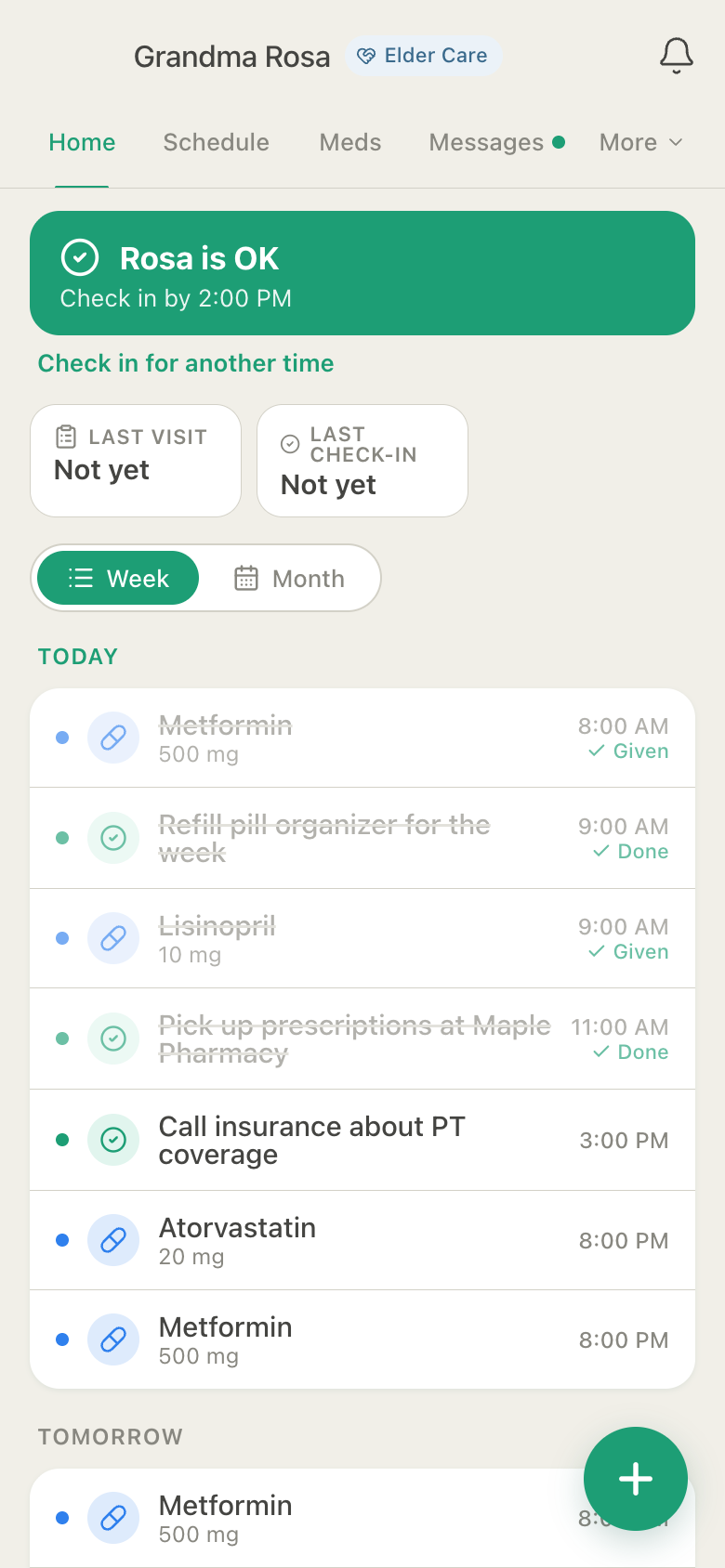
Rosa's day doses Given, tasks Done

HuddleCare Home for Grandma Rosa: the daily check-in button, today's Metformin and Lisinopril doses marked Given, two tasks marked Done, and the rest of the day's doses and tasks

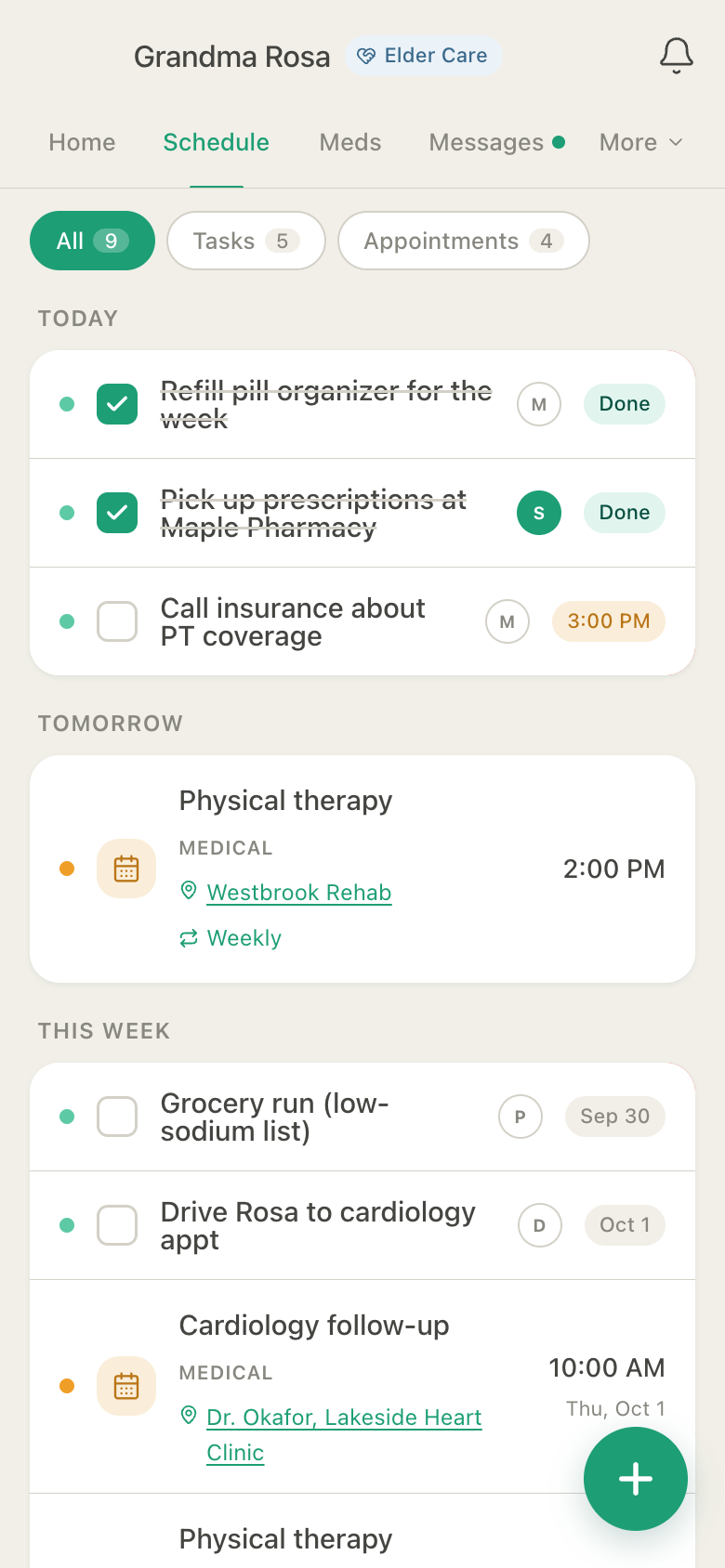
The Schedule who's on each task

HuddleCare Schedule for Grandma Rosa: tasks with each helper's initial, two done today, physical therapy tomorrow and a cardiology follow-up this week
Actual app screens, shown with sample data.
Medications, tasks and appointments in one place Real-time on every phone Siblings, aides and Mom herself Web, iPhone & Android Free to start

Sound familiar?

The family group chat was never a care plan.

Five people, one parent, and a thread where the important things scroll away. Did she get her evening pills? Who is calling the insurance company? What did the cardiologist say? HuddleCare gives each of those questions one place to live, and everyone the same answer.

How it works

Set up Mom's huddle in a few minutes.

  1. 1

    Create Mom's huddle

    Choose care for an adult or aging loved one, add her name, then her medications and appointments. The app speaks the language of caring for a parent from the start.

  2. 2

    Invite the family

    Siblings, the aide, a neighbor with a key. Each one joins with a role (caregiver or viewer) and exactly the access you choose. Mom can have her own account too.

  3. 3

    Log it once

    A dose, a visit, a check-in, a task done. Two taps, and everyone sees it in real time, in Mom's time zone.

What your family can do

Real screens from the app. Nothing mocked up.

Medications

Given, and everyone knows it.

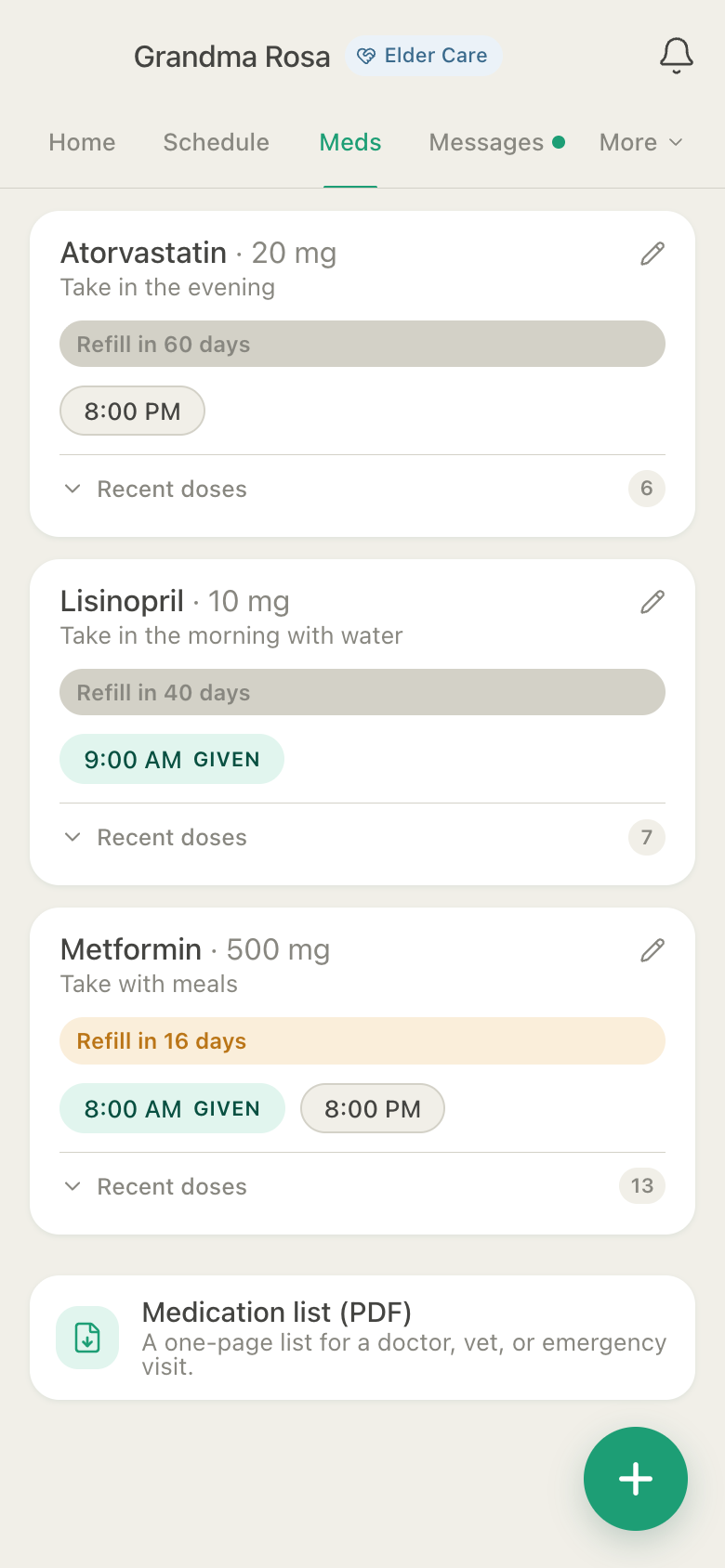
Set her dose times once. Whoever gives a dose taps Given; when a dose is skipped, Not given keeps the reason (asleep, refused it, nausea, out of stock). Refills count down by date or by the supply left. Name a backup member, and they get a notification if a dose still is not logged an hour after it was due.

HuddleCare Medications for Rosa: Atorvastatin at 8 PM, Lisinopril given at 9 AM, Metformin given at 8 AM and due at 8 PM, each with a refill countdown

Vitals & measurements

"How has her blood pressure been?" Here is the chart.

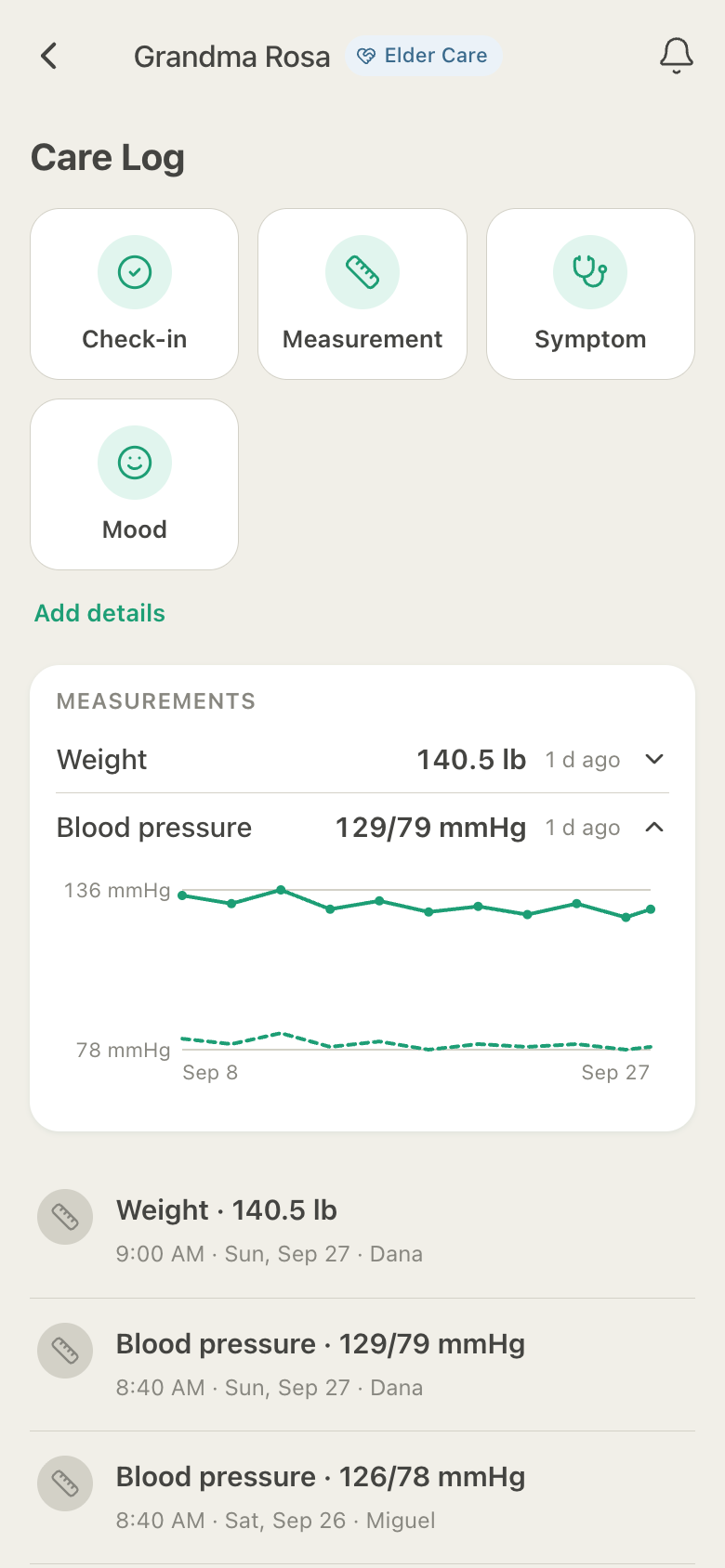
Blood pressure, weight, blood glucose, oxygen, temperature and pain on a 0 to 10 scale, each charted exactly as it was recorded, so the doctor sees the real numbers. No thresholds, no alarms, no advice. That is the clinician's job.

HuddleCare Care Log for Rosa: check-in, measurement, symptom and mood buttons, and a blood pressure chart of three weeks of readings logged by Dana and Miguel

Care journal

How Mom is actually doing.

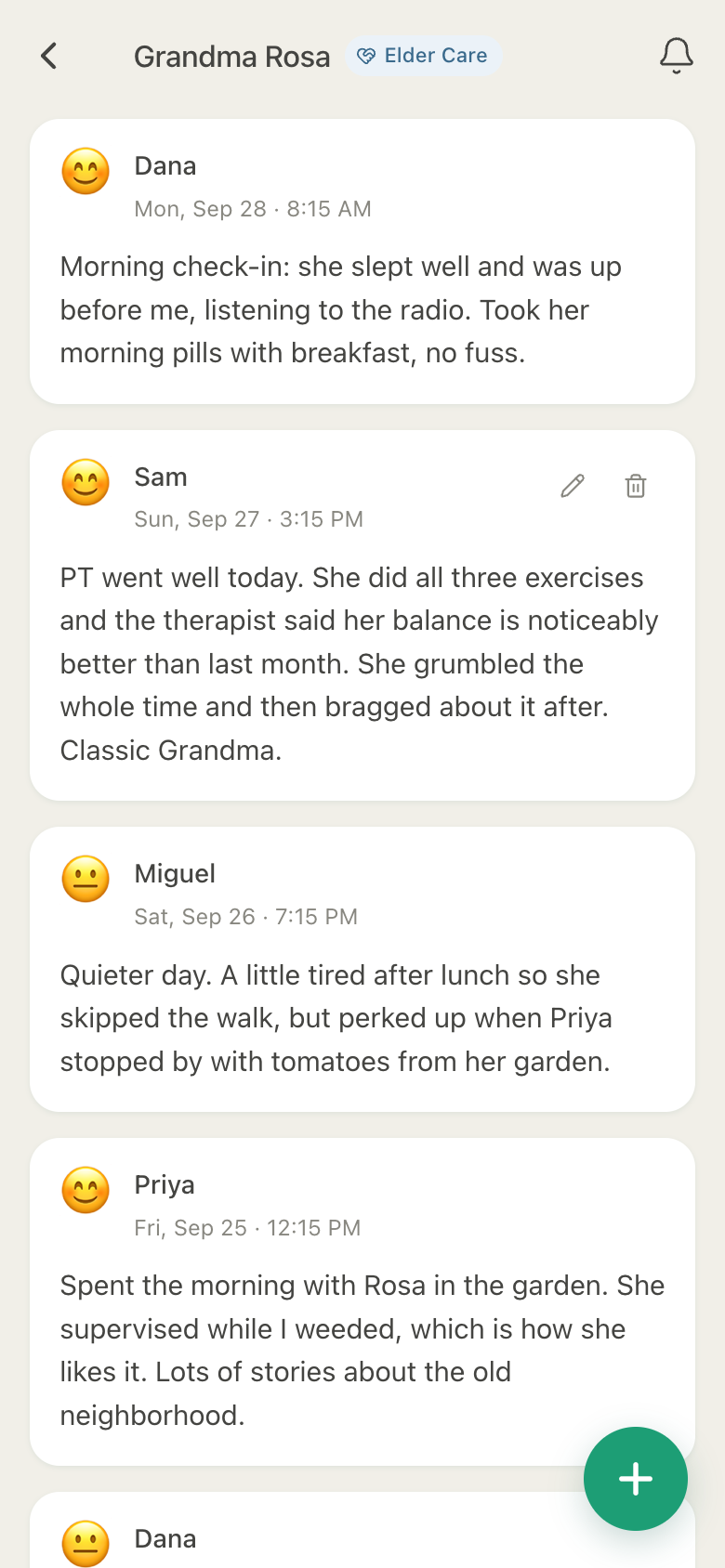
Whoever was there writes how the day went, with a mood, so the sibling three time zones away knows more than "fine". After a visit, a visit note has the checklist for that kind of care: meds given, ate a meal, drank fluids, up and moving, something to watch.

HuddleCare Journal for Rosa: dated updates from Dana, Sam, Miguel and Priya about her morning, her physical therapy and her garden

Emergency Info Card

The critical facts, for anyone who is helping.

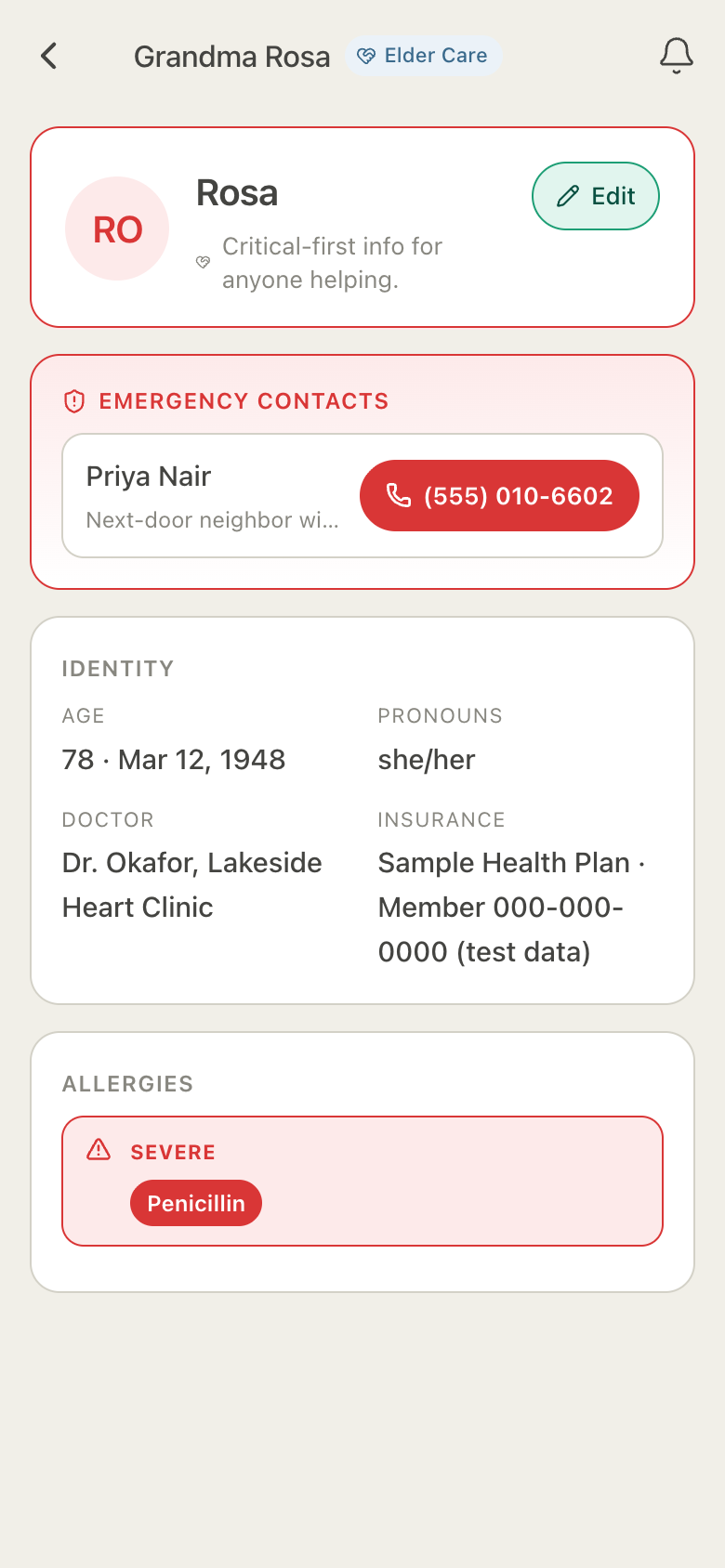
Emergency contacts you can tap to call, allergies flagged as severe, her doctor, her insurance, conditions and where the directive is. Share it by link with an aide or a neighbor. No account needed to view it.

HuddleCare Emergency Info Card for Rosa: a tap-to-call neighbor, her age and doctor, a sample insurance plan and a severe penicillin allergy

Members & access

The whole family, each with the right access.

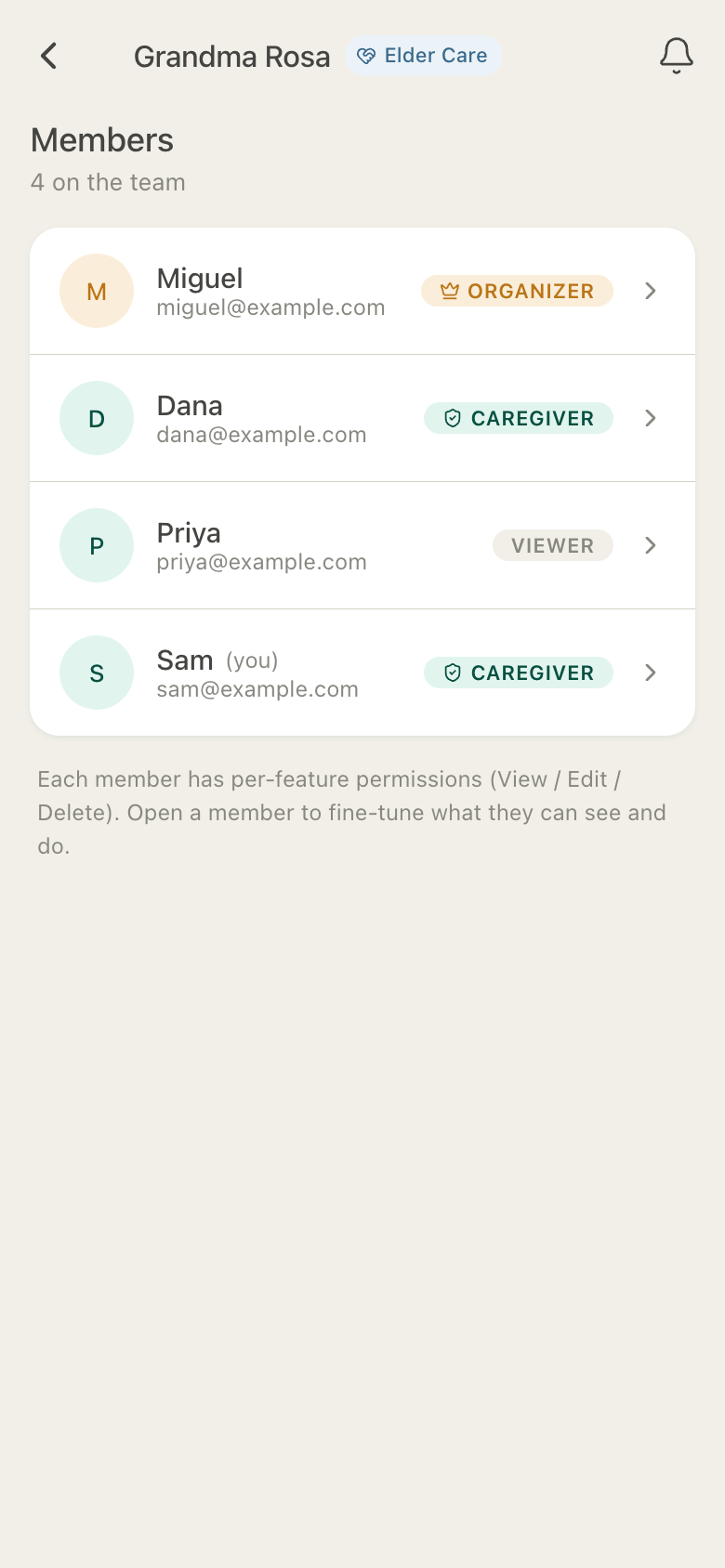
Everyone joins with a role (organizer, caregiver or viewer) and permissions you can tune feature by feature: View, Edit or Delete. An aide for a month gets temporary access that ends on its own. Mom can join as The One We Care For, with a simple view of her own schedule, doses and check-in.

HuddleCare Members for Rosa: Miguel as organizer, Dana and Sam as caregivers, and Priya as a viewer

All screenshots are actual app screens, shown with sample data.

Also in every Elder huddle

Small things that add up to peace of mind.

  • Daily check-in

    "Mom is OK" by a time you choose. If nothing is logged 15 minutes after it, the huddle gets a notification.

  • Appointments

    The provider from your contacts, who is driving, the questions to ask, and notes afterwards.

  • Tasks anyone can claim

    Assign a task, or ask the huddle. Whoever taps "I'll do it" owns it.

  • Her time zone

    8 PM means 8 PM where Mom lives, for every member, in every notification.

  • Documents

    Insurance cards, referrals and forms in one vault, with in-app preview.

  • Shared expenses

    On Plus: log who paid, split it among siblings, and see who owes whom.

See it in action

The questions every family asks, answered in 30 seconds.

Recorded from the real app with sample data. Tap to play; sound off.

"Someone should call the insurance company."Tasks with names on them.
"Did anyone give Mom her 8 PM pills?"Log a dose once. Everyone sees it.
"How has Mom's blood pressure been?"Check-in, vitals and the chart.

Pricing

Simple, honest pricing.

Everything to coordinate one parent's care is free: unlimited medications, tasks, check-ins and charts for up to 5 family members. Plus adds a second huddle when Dad needs care too, a year of history, expenses split among siblings, direct messages and photos.

Switch to annual to save 2 months on Plus or Premium.

Free

Get started, no card required

$0forever
Get started free
  • 1 huddle
  • Up to 5 members
  • Unlimited tasks, medications, events & care-log entries
  • Timers, last-done tiles, check-in, measurements & charts
  • Last 3 months of history
  • 5 documents · max 10 MB each · 50 MB per huddle
  • Group chat (direct messages in paid plans)
  • 1 active temporary member
  • Emergency Info Card, The Week Link & Care Card · share by link
  • PDF exports: it's your data, on every plan

Free forever. Ad-supported when ads launch. Ad-free on Plus and Premium.

Best for complex care

Premium

For multiple loved ones and complex care

$14.99 per month
Get Premium

Cancel anytime

  • Up to 10 huddles
  • 25 members per huddle
  • Unlimited history & charts
  • Unlimited documents · 5 GB storage per huddle
  • Unlimited temporary members
  • Direct messages, photos & expenses
  • Ad-free
  • Priority support

Prices in USD. Your care data is never deleted when a plan lapses. Anything over the Free limits becomes read-only until you upgrade again.

Frequently asked

Questions, answered.

Can my siblings who live far away use it?

Yes. Invite them by email and they see the same medications, tasks, schedule and notes in real time, on the web, iPhone or Android. Times always show in Mom's time zone, so 8 PM means 8 PM where she lives, for everyone.

Does Mom need a smartphone or an account?

No. The family can run her huddle without her. If she wants, she can join as The One We Care For, with her own simple view: her schedule, her doses and her daily check-in, nothing else.

Does HuddleCare tell us what to do about her health?

No. It sends reminders at the dose times you set, and notifies the backup member you name if a dose still is not logged an hour later. It records what your family enters and never gives medical advice: no dosing suggestions, no thresholds, no alarms. That stays with her doctors.

Who can see Mom's information?

Only the members of her huddle, each with the access you give them, feature by feature (View, Edit or Delete). Those permissions are enforced in the database, not just hidden in the app. A temporary member, such as an aide for a month, loses access automatically when the time is up. We do not sell your care content and do not use it to target advertising.

Can we split what we spend on her care?

Yes, on Plus and Premium. Elder huddles have an Expenses page: log who paid, split it equally or your own way, and see who owes whom each month. No money moves through HuddleCare.

What does it cost?

Free covers one huddle with up to 5 members, unlimited medications, tasks, check-ins and care-log entries, and 3 months of history, with no credit card and no time limit. Plus is $7.99 a month or $79.99 a year: up to 5 huddles (Mom and Dad can each have one), 10 members, a year of history, expense splitting, direct messages and photos. The Free tier will be ad-supported once ads launch; Plus and Premium are ad-free.

Looking for something else? Read the full FAQ or visit support.

Give your family one place to care for Mom.

Invite your siblings today. It takes a few minutes, and nobody has to ask the group chat again.

Get started free

Free to start. No credit card. Works in any web browser, on Android, and on iPhone.